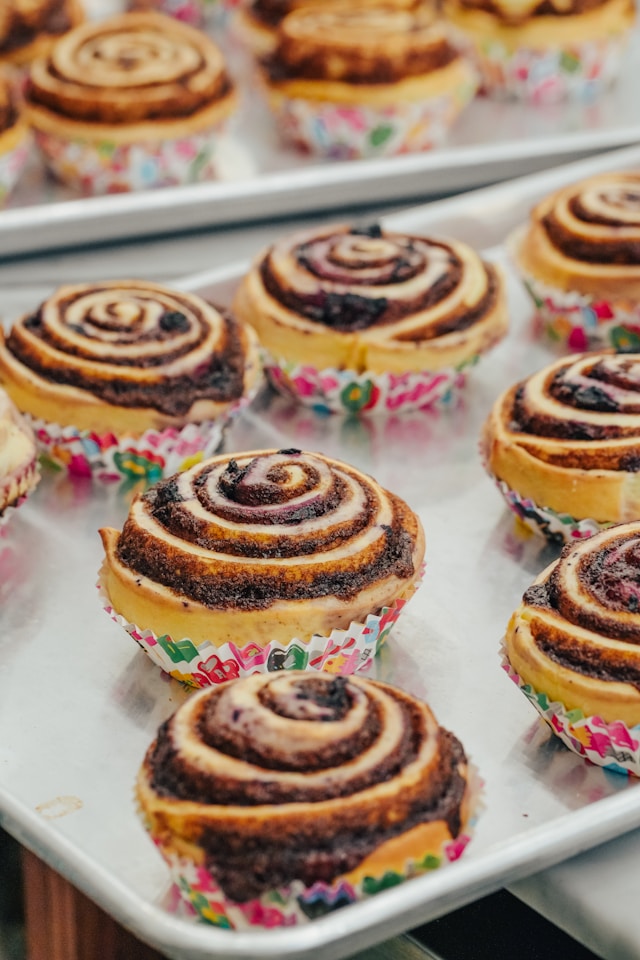


You bake 40 cinnamon rolls for Saturday's market. You sell 28. The rest get tossed. A food drop fixes that — customers order in advance, you make exactly what was ordered, and they pick it up at a set time and place. No booth rental, no leftover inventory, and you get paid before you start cooking.
Here is how to set one up, run it every week, and grow it over time.
The short version: A food drop is a weekly pre-order pickup model where customers order your food in advance and pick it up at a set time and place. You only make what is ordered, so there is no food waste. Customers pay when they order, so you have cash before you cook. To start, pick one consistent day per week, set up a simple ordering system (even a Google Form works), build a small menu of 3-5 items, and collect payment upfront. Run the same schedule every week. Announce each drop through text messages and social media. Start with 10-15 orders and grow from there by asking every customer to bring a friend.
A food drop is a scheduled, recurring sales event where customers pre-order your food and pick it up at a set time and location. You decide what to sell, when orders open, when they close, and when customers pick up. Then you make only what was ordered.
Think of it as a farmers market you fully control — except there is no booth fee, no 5 AM setup, no eight-hour day in the sun, and no unsold product at the end.
The model goes by several names depending on who you ask. Home bakers call it porch pickup. Cottage food groups call it a food drop. Some vendors call it a pre-order pickup or a weekly pop-up. The mechanics are the same regardless of what you call it:
Food drops are especially popular with home bakers, cottage food producers, and small-scale farmers who sell direct-to-consumer. The model works for baked goods, jams, sauces, meal prep, fresh produce, eggs, honey — anything perishable that benefits from being made or harvested to order rather than in advance.
The food drop model solves the three biggest problems small food vendors face: waste, unpredictable income, and time. Here is why it works so well.
This is the single biggest advantage. When you bake for a farmers market, you are guessing how much to make. Make too much and you lose money on ingredients. Make too little and you leave revenue on the table.
With a food drop, you know exactly how many cinnamon rolls, loaves of bread, or jars of salsa you need before you buy a single ingredient. Zero guessing. Zero waste.
This is not a small deal. Research from Champions 12.3 found that restaurants save $7 for every $1 they invest in reducing food waste — a 7:1 return. For a home baker or small vendor operating on tight margins, eliminating waste entirely means every dollar you spend on ingredients turns into revenue.
Most food drop vendors collect payment when the order is placed, not at pickup. That means you have cash in hand before you spend anything on ingredients.
Compare that to a farmers market, where you spend money on ingredients days before you know if you will sell enough to cover them. With pre-orders, your ingredient costs are already funded by customer payments. Your cash flow is predictable, and you never front money on food that might not sell.
At a farmers market, the market sets your schedule. You show up at 6 AM, stand behind a booth until 2 PM, and hope the weather cooperates. A food drop runs on your calendar.
You choose your drop day. You choose your pickup window. You choose your order deadline. If you have a busy week, you can cap orders at 15 instead of 30. If you want to take a week off, you simply do not open orders. No booth rent lost, no market manager to notify.
You do not deliver. You do not drive anywhere. Customers come to your location during your pickup window and grab their labeled order.
This matters more than it sounds. Research shows that over 90% of consumers find pickup convenient, and 67% visit more frequently when direct ordering is available. Your customers are already comfortable with the pickup model from ordering at restaurants, coffee shops, and grocery stores. You are not asking them to do anything unfamiliar.
Setting up a food drop does not require expensive equipment or complicated software. Here is what you need to get started, step by step.
Choose one day per week and stick with it. Consistency is what turns a one-time buyer into a weekly regular. If your drop is every Saturday from 3-5 PM, your customers will build it into their weekend routine.
When choosing your day, work backward from your production schedule:
Set a pickup window of 2-3 hours. That is long enough for customers to fit it into their schedule without requiring you to stand at your door all day.
Most food drop vendors start with their home — a front porch, driveway, or garage. This keeps things simple and costs nothing.
Your pickup location options:
When to move beyond your porch: if you are consistently hitting 30+ orders per drop, if parking on your street is becoming a problem, or if your zoning does not allow regular commercial activity at your home address, it is time to find a community pickup location.
You do not need fancy software to take pre-orders. Start simple and upgrade as you grow.
Ordering system options from simplest to most capable:
For a deeper walkthrough on setting up pickup ordering, read How to Offer Pickup Orders for Your Food Business.
Set a clear order deadline. Orders should close at least 24-48 hours before your drop so you have time to shop, prep, and produce. A common setup: orders open Monday, close Wednesday at noon, pickup is Saturday. This gives you three full days to work.
Want to set up an online storefront for your food drops? Set up your ordering page and let customers order and pay in one place.
Keep your menu small. Three to five items per drop is the sweet spot for most vendors.
Menu rules that work:
Collect payment when the order is placed, not at pickup. This is non-negotiable for running a smooth food drop.
Why upfront payment matters:
Payment options: Venmo, Zelle, Cash App, Square invoices, or online checkout through your storefront. If you use a Google Form for orders, include payment instructions in the confirmation message and require payment within 24 hours to hold the order.
Once your food drop is set up, the weekly cycle follows a predictable pattern. Here is a sample workflow for a Saturday drop:
This is a template. Adjust the days and timing to fit your production schedule. The key is that the cycle stays the same every week so your customers know exactly what to expect.
Consistent, predictable communication is what turns a one-time buyer into a weekly regular. Your customers need to know when orders open, what is available, and when to pick up — every single week.
The most effective communication channels for food drops:
Communication timing matters as much as the channel. Post your menu preview the day before orders open. Announce when orders are live. Send a reminder before the deadline closes. Send a pickup reminder the day before or morning of. Follow the same schedule every week.
Build anticipation between drops. Show behind-the-scenes prep. Share what you are testing for next week. Post photos of sold-out items to reinforce urgency. The vendors who communicate consistently are the ones whose drops sell out.
Every food drop vendor deals with customers who forget to pick up, show up late, or want to change their order after the deadline. Having clear policies from the start saves you time, money, and uncomfortable conversations.
Set these policies before your first drop and communicate them on every order confirmation:
The key is consistency. Apply these policies the same way every time, for every customer. When your rules are clear and public, most customers will respect them without issue.
Each sales channel has different trade-offs. The right choice depends on where you are in your business and what you need most right now.
Here is how they compare:
| Channel | Time Per Week | Startup Cost | Revenue Predictability | Customer Acquisition | Best For |
|---|---|---|---|---|---|
| Food drop (pre-order pickup) | 2-3 hours + production | Near zero | High — know sales before producing | Low — existing customers | Steady weekly income from regulars |
| Farmers market | 6-10 hours per market day | $260-$815/season | Low — weather and traffic dependent | High — new customers weekly | Brand awareness, testing products |
| Online ordering with pickup | 1-2 hours | $10/month | Moderate to high | Moderate — broader reach | Reorders between markets or drops |
Most successful vendors do not pick just one. They layer channels so that each one feeds the others. Farmers markets bring in new customers. Food drops convert those new customers into weekly regulars. Online stores give everyone a way to reorder between drops.
For a deeper comparison of farmers markets and online selling, read our guide on farmers market vs. online store. And for strategies on moving your market customers into your recurring sales channels, see how to convert market customers to online customers.
Starting small is the right move. Your first few drops are about building systems, not maximizing volume. But once your process is smooth and your regulars are consistent, here is how to grow.
Proven growth strategies for food drops:
Growth should be gradual. Add 5-10 orders per week, not 30 overnight. Every jump in volume requires a small adjustment to your workflow — more prep time, more packaging supplies, a bigger cooler. Scale at a pace that keeps quality high.
The food drop model works because it removes the two biggest headaches of selling food: waste and unpredictability. You know what you are making. You know who is buying it. You get paid before you start cooking. And you do it all on a schedule you control.
Here is the simplest way to start:
You do not need a commercial kitchen, a delivery vehicle, or a big social media following. You need a consistent schedule, a small menu, and 10-15 customers who know when and where to show up. The rest grows from there.
Ready to start taking pre-orders for your food business? Set up your ordering page and give your customers a simple way to order, pay, and pick up every week.
It depends on your state and what you are selling. If your products qualify under your state's cottage food law, you can sell them from your home without a commercial kitchen license in most states. Some states require a basic cottage food permit or registration, while others require nothing beyond following the rules. Check your state's cottage food law for the specific requirements that apply to your products, your annual sales cap, and whether home-based pickup sales are allowed.
Start with 10-15 orders. This is large enough to feel like a real business activity but small enough to manage without any systems breaking. You will learn how long it takes to produce, package, and organize orders at this scale. Once you can run 10-15 orders smoothly every week for a month, increase by 5-10 orders per week until you hit your comfortable capacity.
The simplest options are Venmo, Zelle, or Cash App for small drops where you are taking orders manually. For larger drops or a more professional setup, use an online storefront that collects payment at checkout. The most important rule is to collect payment when the order is placed, not at pickup. Upfront payment reduces no-shows, funds your ingredient purchases, and gives you an accurate order count before production.
Yes, and many vendors do. Farmers markets are where new customers discover you. Food drops are where those customers become weekly regulars. A common approach is to hand out a card or flyer at your market booth with your food drop details and ordering link. The market brings in new faces, and the food drop keeps them coming back without requiring you to be at a booth every weekend.
Use insulated coolers with ice packs at your pickup station and label each order clearly. For frozen items, instruct customers to bring an insulated bag for transport. Keep your pickup window short (2-3 hours) so items spend minimal time sitting out. If your pickup area is outdoors in warm weather, a canopy or shade cover helps. Some vendors set up a separate cooler station for cold items and a table for shelf-stable items so customers can grab both quickly.
Set quantity limits on every item before you open orders. When an item sells out, close it. If your entire drop fills up, close ordering and let customers know they can order next week. Do not overcommit. It is far better to have a sold-out drop with happy customers than a huge drop where quality suffers or pickup runs behind schedule. Consistently selling out is also a growth signal — it means it is time to increase your limits gradually or add a second drop day.